Educational outcomes
Student:
- explains how to implement different concepts of objectivity in relational model using natural language (understanding);
- identifies and corrects errors in the source code, which is an implementation of the above structure;
- lists constructs implemented in the source code (understanding);
- implements the above structures using the selected programming language (application);
- indicates functional differences between two selected programs based on code snippets source (analysis);
- creates a program that implements specific business requirements using the constructs learned from the lectures (synthesis);
Justification
Modern programming languages are mostly based on the object paradigm. Therefore, its practical understanding is a necessary basis for working in this profession. Moreover, programmers often make systems based on analytical materials. And these largely use object-oriented graphical notations (such as UML). During this and the next lessons, you will deepen your theoretical bond, but first of all you will learn how to implement different concepts from object-orientness. This will allow you to design and implement modern business applications.
Object-relational mappers
I think we will agree that direct work with a relational database is not very convenient. The same opinion have creators of a number of additional libraries, whose task is to facilitate access to the relational database. One such library is Hibernate (http://www.hibernate.org/). This project is developed as open source since 2001. At the moment it is already mature and used by hundreds of thousands of developers all over the world. As a curiosity you can note that the core part of the source code is 76k lines, and each day it is downloaded 3000 times. There is also a version for Microsoft .NET. In the remainder of this chapter, we will take a brief look at this interesting technology.
The Hibernate library (and most other ORMs) does not completely eliminate the problem of impedance mismatch, but only reduces it. The programmer is constantly aware of the existence of a relational database and is partially limited by it. Nevertheless, it still greatly facilitates his/her work.
In every major project, and to such Hibernate is also used, the performance of the solution is crucial. If it is insufficient, even the most wonderful library will remain only a curiosity. Fortunately, its creators have applied different optimization techniques:
- Caching objects. It depends on "smart" access to objects. If it has not changed since the last use, it is not extracted from the database (which would take a while), but from a special structure existing in the programming language (eg Java or C#).
- Cache query results. A method similar to the above, but related to query results. If the requested data has not changed, the result is not retrieved from the database but from a special "container" stored on the programming language side.
- SQL statements are executed only when they are really needed, eg when "consuming" the result.
- Not updating unmodified objects. Hibernate has a special method for updating an object and sending it to the database. If the content of the object has not been changed, there is no need to send it to the database.
- Effective collection management.
- Merge multiple changes into one UPDATE. Use optimizations provided by native database language (eg SQL).
- Lazy initialization of objects and collections.
The big advantage of the above optimization is that they are transparent to the developer. This does not require any special action to use them.
Microsoft Entity Framework i LINQ
While discussing the object-relational mappers, it is also worth mentioning LINQ technology (Language Integrated Query) developed by Anders Hejlsberg from Microsoft. The idea is to add to the existing programming language (eg MS C#) the syntax and functionality
for writing queries similar to SQL. Emphasize: this is all part of the programming language (similar to other structures in C# like, for example Conditional statement if or for loop:
// A collection of customers from the city of London
var q = from c in db.Customers
	where c.City == "London"
	select c;

// For each customer we display the company name
foreach (Customer c in q)
	Console.WriteLine(c.CompanyName);

// Orders containing a specific code
var q = from o in db.Orders
	where o.ShipVia == 3
	select o;

// Browsing orders and executing C# methods
foreach (Order o in q) {
	if (o.Freight > 200)
		SendCustomerNotification(o.Customer);
	ProcessOrder(o);
}
This avoids sending commands (such as SQL) as expressions of type string. As a result, we got strong typological control (errors detected at compile stage, not execution), IDE hints, refactoring. What's more, there are LINQ
versions that run on non-standard LINQ to Objects collections, but also on XML, JSON, and databases. Especially the latter approach in conjunction with ORM: Entity Framework is interesting to us (because it is similar to Hibernate).
Interested parties are encouraged to read EF docs for this interesting technology.
Hibernate - introduction
Let's get back to Java and Hibernate. We will use the official tutorial, but with custom classes.
Database
Hibernate with Java works by default with a database via JDBC. As a database, we can use:
- Standard solutions, e.g. MariaDB, MySQL,
- Light systems written in Java, e.g. H2, HSQL or Apache Derby.
- Usually you only need to use a small jar file containing all the necessary components;
- For testing purposes, it is convenient to use the in-memory mode (data is not saved to a file and may be lost).
We will use the database H2 written entirely in Java. Thanks to this, we will avoid (sometimes) complicated installation and configuration. You can do it in several ways:
- "manually" i.e. downloading a distribution archive, unpacking it and adding it as a library to our IDE project;
- configure the IDE to download the appropriate library from the Maven repository, e.g. com.h2database:h2:1.4.199 (this is how it is configured source files for this lecture ).
We can run the database in two ways:
- classic in server mode - file bin/h2.bat or bin/h2.sh (available simple configuration console via browser);
- simplified mode - it will be automatically started by the Hibernate after proper configuration (see below). This requires adding the appropriate jar file to the project launch libraries in the IDE.
Configuration file
A single configuration file contains all settings related to Hibernate, including the database.
<!DOCTYPE hibernate-configuration PUBLIC
"-//Hibernate/Hibernate Configuration DTD 3.0//EN"
"http://www.hibernate.org/dtd/hibernate-configuration-3.0.dtd">

<hibernate-configuration>
	<session-factory>
		<!-- Database connection settings -->
		<property name="connection.driver_class">org.h2.Driver</property>
		<property name="connection.url">jdbc:h2:mem:db1;DB_CLOSE_DELAY=-1;MVCC=TRUE</property>
		<!--<property name="connection.url">jdbc:h2:~/db-test.h2</property>-->
		<!--<property name="connection.url">jdbc:h2:tcp://localhost/~/db-test.h2</property>-->
		<property name="connection.username">sa</property>
		<property name="connection.password"></property>

		<!-- JDBC connection pool (use the built-in) -->
		<property name="connection.pool_size">1</property>

		<!-- SQL dialect -->
		<property name="dialect">org.hibernate.dialect.H2Dialect</property>

		<!-- Disable the second-level cache  -->
		<property name="cache.provider_class">org.hibernate.cache.internal.NoCacheProvider</property>

		<!-- Echo all executed SQL to stdout -->
		<property name="show_sql">true</property>

		<!--Drop and re-create the database schema on startup-->
		<property name="hbm2ddl.auto">create</property>

		<!-- Enable Hibernate stats in the logs -->
		<property name="hibernate.generate_statistics">false</property>

		<!-- Full names the annotated entity class -->
		<mapping class="mt.mas.hibernate.Movie"/>
		<mapping class="mt.mas.hibernate.Actor"/>

	</session-factory>
</hibernate-configuration>
Depending on the type/mode of operation of the H2 database (note the selection of the appropriate driver in connection.driver_class), e.g.:
- in-memory mode. Convenient for testing (without preserving data permanently), the BD management system is started automatically.
XML
<!-- Database connection settings --> <property name="connection.driver_class">org.h2.Driver</property> <property name="connection.url">jdbc:h2:mem:db1;DB_CLOSE_DELAY=-1;MVCC=TRUE</property> <property name="connection.username">sa</property> <property name="connection.password"></property> - file mode. Requires the server H2 to be started. You may also need to provide additional settings, e.g. a password.
XML
<!-- Database connection settings -->
<property name="connection.driver_class">org.h2.Driver</property>
<property name="connection.url">jdbc:h2:~/db-test.h2</property>
<property name="connection.username">sa</property>
<property name="connection.password">sa</property>
Data mapping
Unfortunately, Hibernate does not work fully automatically (just like other ORMs) and you need to define the way the (relational) DB structure is mapped to object-oriented (Java). We have several options to choose from, among others:
- native Hibernate annotations,
- JPA annotations,
- external XML mapping file (for each Java class).
It seems that the best (especially for new projects) is to use annotations that comply with the JPA standard. Thanks to this, all information will be in one place (Java source code), and the possible ORM change should be quite painless.
Hibernate - class and attribute mapping
It is recommended to use the JavaBean convention, i.e. create dedicated set/get methods for changing and reading attribute values. You will also need a private, parameterless constructor.
In our example, we'll create a simple application that allows you to storing information about movies and combining movies with actors. The sample code for the Movie class is shown below. As you can see, we have information
about the title of the movie (2) and its date (3). For each of the attributes we have created appropriate methods for changing its value and reading (so-called getters and setters). It is worth noting that this class does not have to inherit
from any special superclass or implement dedicated interfaces.
public class Movie {
	private String title;
	private LocalDate releaseDate;

	public Movie() {
	}

	public Movie(String title, LocalDate releaseDate, MovieCategory movieCategory) {
		this.releaseDate = releaseDate;
		this.title = title;
		this.movieCategory = movieCategory;
	}

	public LocalDate getReleaseDate() {
		return releaseDate;
	}

	public void setReleaseDate(LocalDate releaseDate) {
		this.releaseDate = releaseDate;
	}

	public String getTitle() {
		return title;
	}

	public void setTitle(String title) {
		this.title = title;
	}
}
Object ID
Each class that wants to use the full capabilities of the library must have a specific attribute to identify instances. It is usually private and numeric, e.g. private long id. Hibernate is responsible for changing its value.
As we can see in the list below, we have a dedicated attribute required by Hibernate, and used to store the object identifier. We also added the required annotations: @Id, @GeneratedValue, @GenericGenerator.
@Entity(name = "Movie")
public class Movie {

	// [...]

	private long id;

	@Id
	@GeneratedValue(generator="increment")
	@GenericGenerator(name="increment", strategy = "increment")
	public long getId() {
		return id;
	}

	private void setId(long id) {
		this.id = id;
	}
}
Annotations can be applied to attributes or getters .
Simple attributes
As we mentioned earlier, we must provide information on which elements of the class are to be reflected in the relational model. The @javax.persistence.Basic annotation applies to:
- simple types,
- several others, including String and related dates.
It can be omitted because this is the default behavior of Hibernate.
In special situations, we can provide optional parameters:
-
optional. Specifies the acceptability of nulls (True), -
fetch. The method of retrieving values (Eager).
Sometimes, the @javax.persistence.Column annotation may also be useful, which provides more customization options, e.g. column name in DB and an @javax.persistence.Type annotation allowing you to choose data type
in DB.
Below is the code for the class describing the movie along with the required annotations to define the attributes to map.
@Entity(name = "Movie")
public class Movie {

	// [...]

	private LocalDate releaseDate;
	private String title;

	@Basic
	public LocalDate getReleaseDate() {
		return releaseDate;
	}

	public void setReleaseDate(LocalDate releaseDate) {
		this.releaseDate = releaseDate;
	}

	@Basic
	public String getTitle() {
		return title;
	}

	public void setTitle(String title) {
		this.title = title;
	}
}
Derived attributes
Sometimes there is a need to use a derivative (computable) attribute. As we remember, it is usually not stored but calculated if necessary. In the case of Hibernate, we need to use the annotation @javax.persistence.Transient,
which means ignoring the specified attribute or getter and the associated attribute. The following example shows this for attributes derived from Age and Name (implemented as getters).
@Entity(name = "Actor")
public class Actor {

	// [...]

	private String firstName;
	private String lastName;
	private LocalDate birthDate;

	@Transient
	public String getName() {
		return getFirstName() + " " + getLastName();
	}

	@Transient
	public int getAge() {
		return Period.between(getBirthDate(), LocalDate.now()).getYears();
	}

	@Basic
	public String getFirstName() {
		return firstName;
	}

	public void setFirstName(String firstName) {
		this.firstName = firstName;
	}

	@Basic
	public String getLastName() {
		return lastName;
	}

	public void setLastName(String lastName) {
		this.lastName = lastName;
	}

	@Basic
	public LocalDate getBirthDate() {
		return birthDate;
	}

	public void setBirthDate(LocalDate birthDate) {
		this.birthDate = birthDate;
	}
}
The enum attributes
In situations where we need to distinguish certain things in the application, it is worth to use the enum structure. It can also be mapped in Hibernate using the @javax.persistence.Enumerated annotation. We can also
define how these values will be remembered in the database:
-
EnumType.ORDINAL. Uses a numeric value -
EnumType.STRING. Uses the enum's name.
Below is a code that adds movie categories made using a defined enum.
@Entity(name = "Movie")
public class Movie {

	// [...]

	public enum MovieCategory {Unknown, Comedy, SciFi}

	@Enumerated
	public MovieCategory getMovieCategory() {
		return movieCategory;
	}

	public void setMovieCategory(MovieCategory movieCategory) {
		this.movieCategory = movieCategory;
	}

	@Override
	public String toString() {
		var sb = new StringBuilder();

		sb.append(String.format("Movie: %s released on %s as %s (#%s @%s)", getTitle(), getReleaseDate(), getMovieCategory(), getId(), super.hashCode()));

		return sb.toString();
	}
}
Note also the override of the toString() method, which allows displaying information about the mapped object.
Working with Hibernate
Working with the Hibernate library is quite easy, but you need to follow a few rules and you should use the auxiliary classes.
Sessions in Hibernate
Working with a database takes place in the so-called sessions in which individual operations (or sets of them) are wrapped in transactions. This is quite a standard way of working with a DB. The following is an example of how to do it:
StandardServiceRegistry registry = null;
SessionFactory sessionFactory = null;

try {
	registry = new StandardServiceRegistryBuilder()
			.configure() // configures settings from hibernate.cfg.xml
			.build();
	sessionFactory = new MetadataSources(registry).buildMetadata().buildSessionFactory();

	Session session = sessionFactory.openSession();
	session.beginTransaction();

	// Do something within the session, e.g. create/retrieve objects, etc.

	session.getTransaction().commit();
	session.close();
}
catch (Exception e) {
	e.printStackTrace();
	StandardServiceRegistryBuilder.destroy( registry );
}
finally {
	if (sessionFactory != null) {
		sessionFactory.close();
		sessionFactory = null;
	}
}
-
Create a
registry. -
Create a
session factory. - Open the session.
- Start the transaction.
- Perform operations, e.g. creating, updating, deleting data.
- Commit the transaction and close the session.
Identity of objects
Hibernate ensures that the same object (primary key) retrieved from the database in a single session will have the same instance in the Java environment. Sometimes it may be helpful to implement your own equals() and hashCode() methods with the annotation attribute: @NaturalId. More in the Hibernate documentation.
Creating and saving objects
Time to check the library in action. Let's just remember about the proper placement of the XML configuration file. Let's look at the code below and comments:
var movie1 = new Movie("Terminator 1", LocalDate.of(1984, 10,26), Movie.MovieCategory.SciFi);
var movie2 = new Movie("Terminator 3", LocalDate.of(2003, 8,8), Movie.MovieCategory.SciFi);

System.out.println(movie1);
System.out.println(movie2);

Session session = sessionFactory.openSession();
session.beginTransaction();
session.save(movie1);
session.save(movie2);
session.getTransaction().commit();
session.close();
As you can see, we create objects with the standard new (1) operator, save in the session (9) and confirm the transaction (11). From that moment they are already in the database and we can use them normally.
Retrieving data
In order to retrieve data using Hibernate, we can use the SQL-like query language. As shown in the list below, we work on complete objects (class Movie) and not (as in the case of "pure" JDBC) on plain values (eg String)
from the database. Of course, the objects contain the correct primary keys.
System.out.println("\nMovies from the db:");

session = sessionFactory.openSession();
session.beginTransaction();
List<Movie> moviesFromDb = session.createQuery("from Movie").list();
for ( var movie : moviesFromDb) {
	System.out.println(movie);
}
session.getTransaction().commit();
session.close();
The log file
The activities of Hibernate can also be seen in the log file. Thanks to this, we can follow the actions performed by the library, which is an invaluable help in correcting errors. Also notice that we can preview SQL commands sent to DB (lines: 8, 10, 17-19, 22):
1:01:10 PM org.hibernate.Version logVersion INFO: HHH000412: Hibernate Core {5.4.1.Final}
1:01:11 PM org.hibernate.engine.jdbc.connections.internal.DriverManagerConnectionProviderImpl configure WARN: HHH10001002: Using Hibernate built-in connection pool (not for production use!)
1:01:11 PM org.hibernate.engine.jdbc.connections.internal.DriverManagerConnectionProviderImpl buildCreator INFO: HHH10001005: using driver [org.h2.Driver] at URL [jdbc:h2:mem:db1;DB_CLOSE_DELAY=-1;MVCC=TRUE]
1:01:11 PM org.hibernate.engine.jdbc.connections.internal.DriverManagerConnectionProviderImpl buildCreator INFO: HHH10001001: Connection properties: {password=****, user=sa}
1:01:11 PM org.hibernate.engine.jdbc.connections.internal.DriverManagerConnectionProviderImpl buildCreator INFO: HHH10001003: Autocommit mode: false
1:01:11 PM org.hibernate.engine.jdbc.connections.internal.DriverManagerConnectionProviderImpl$PooledConnections <init> INFO: HHH000115: Hibernate connection pool size: 1 (min=1)
1:01:11 PM org.hibernate.resource.transaction.backend.jdbc.internal.DdlTransactionIsolatorNonJtaImpl getIsolatedConnection INFO: HHH10001501: Connection obtained from JdbcConnectionAccess [org.hibernate.engine.jdbc.env.internal.JdbcEnvironmentInitiator$ConnectionProviderJdbcConnectionAccess@423c5404] for (non-JTA) DDL execution was not in auto-commit mode; the Connection 'local transaction' will be committed and the Connection will be set into auto-commit mode.
Hibernate: drop table Movie if exists
1:01:11 PM org.hibernate.resource.transaction.backend.jdbc.internal.DdlTransactionIsolatorNonJtaImpl getIsolatedConnection INFO: HHH10001501: Connection obtained from JdbcConnectionAccess [org.hibernate.engine.jdbc.env.internal.JdbcEnvironmentInitiator$ConnectionProviderJdbcConnectionAccess@6add8e3f] for (non-JTA) DDL execution was not in auto-commit mode; the Connection 'local transaction' will be committed and the Connection will be set into auto-commit mode.
Hibernate: create table Movie (id bigint not null, movieCategory integer, releaseDate date, title varchar(255), primary key (id))
1:01:11 PM org.hibernate.engine.transaction.jta.platform.internal.JtaPlatformInitiator initiateService INFO: HHH000490: Using JtaPlatform implementation: [org.hibernate.engine.transaction.jta.platform.internal.NoJtaPlatform]

Created movies:
Movie: Terminator 1 released on 1984-10-26 as SciFi (#0 @1.5B)
Movie: Terminator 3 released on 2003-08-08 as SciFi (#0 @1.3B)

Hibernate: select max(id) from Movie
Hibernate: insert into Movie (movieCategory, releaseDate, title, id) values (?, ?, ?, ?)
Hibernate: insert into Movie (movieCategory, releaseDate, title, id) values (?, ?, ?, ?)

Movies from the db:
Hibernate: select movie0_.id as id1_1_, movie0_.movieCategory as movieCat2_1_, movie0_.releaseDate as releaseD3_1_, movie0_.title as title4_1_ from Movie movie0_
Movie: Terminator 1 released on 1984-10-26 as SciFi (#1 @2B)
Movie: Terminator 3 released on 2003-08-08 as SciFi (#2 @1.8B)
1:01:12 PM org.hibernate.engine.jdbc.connections.internal.DriverManagerConnectionProviderImpl$PoolState stop
INFO: HHH10001008: Cleaning up connection pool [jdbc:h2:mem:db1;DB_CLOSE_DELAY=-1;MVCC=TRUE]
Database scheme
Of course, Hibernate automatically creates an appropriate relational data model in DB. After "generating" data (stable version of the data model), the fragment of the file hibernate.cfg.xml should be commented or removed (otherwise the schema will be updated and existing data will be deleted after the program starts).
<!-- Drop and re-create the database schema on startup -->
<!-- <property name="hbm2ddl.auto">create</property> -->
Hibernate - mapping directed associations
So far, we only dealt with a very simple class that was not connected to other classes. Of course, in real projects of this type, the situation is extremely rare. Fortunately, Hibernate also enables us to work with associations that are (almost) automatically mapped to database relationships. Association elements that need to be considered are:
- direction
- cardinalities
- behavior of the collection (on the Java side).
To extend our example, we will create an Actor and associate it with movies (Movie). The presented example code is quite simple and does not require any special comments. Just note that we have placed the private
ID required by Hibernate. We also need to make a new entry in the main configuration file (equivalent to <mapping class="mt.mas.hibernate.Actor"/>)
@Entity(name = "Actor")
public class Actor {
	private long id;
	private String firstName;
	private String lastName;
	private LocalDate birthDate;

	/**
		* Required by Hibernate.
		*/
	public Actor() {
	}

	public Actor(String firstName, String lastName, LocalDate birthDate) {
		this.firstName = firstName;
		this.lastName = lastName;
		this.birthDate = birthDate;
	}

	@Id
	@GeneratedValue(generator="increment")
	@GenericGenerator(name="increment", strategy = "increment")
	public long getId() {
		return id;
	}

	private void setId(long id) {
		this.id = id;
	}

	@Basic
	public String getFirstName() {
		return firstName;
	}

	public void setFirstName(String firstName) {
		this.firstName = firstName;
	}

	@Basic
	public String getLastName() {
		return lastName;
	}

	public void setLastName(String lastName) {
		this.lastName = lastName;
	}

	@Basic
	public LocalDate getBirthDate() {
		return birthDate;
	}

	public void setBirthDate(LocalDate birthDate) {
		this.birthDate = birthDate;
	}

	@Transient
	public String getName() {
		return getFirstName() + " " + getLastName();
	}

	@Transient
	public int getAge() {
		return Period.between(getBirthDate(), LocalDate.now()).getYears();
	}
}
For the Movie class we will add information about the actors playing in it (actors). We use a List container (other types are also supported). We will also use the @OneToMany annotation.
The relevant code snippets is below:
@Entity(name = "Movie")
public class Movie {

	// [...]

	private List<Actor> actors = new ArrayList<>();

	@OneToMany(mappedBy = "movie", cascade = CascadeType.ALL, orphanRemoval = true)
	private List<Actor> getActors() {
		return actors;
	}

	private void setActors(List<Actor> actors) {
		this.actors = actors;
	}

	public void addActor(Actor actor) {
		getActors().add(actor);
	}

	public void removeActor(Actor actor) {
		getActors().remove(actor);
	}
}
As a result of these operations, Hibernate generated the following database schema. Note that we have also received an intermediary table, which is not needed for 1: *, but it will be useful later.
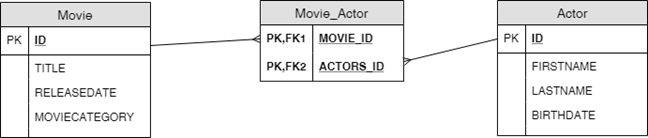
At the Java language level, there is a connection (Java references) from the Movie to Actor (but note: not the other way). We add the links by modifying the Java container. Hibernate automatically detects
this and updates the database upon saving. Similar "automation" exists for attributes.
And yet our new association in action: we create movies (7) and actors (13). Next, we add the actors to the movies (21), save to the session (27) and commit the transaction (32). Then we retrieve the objects.
registry = new StandardServiceRegistryBuilder()
		.configure() // configures settings from hibernate.cfg.xml
		.build();
sessionFactory = new MetadataSources(registry).buildMetadata().buildSessionFactory();

System.out.println("Created movies:");
var movie1 = new Movie("Terminator 1", LocalDate.of(1984, 10,26), Movie.MovieCategory.SciFi);
var movie2 = new Movie("Terminator 3", LocalDate.of(2003, 8,8), Movie.MovieCategory.SciFi);

System.out.println(movie1);
System.out.println(movie2);
System.out.println("Created actors:");
var actor1 = new Actor("Arnold", "Schwarzenegger", LocalDate.of(1947, 7, 30));
var actor2 = new Actor("Claire", "Danes", LocalDate.of(1979, 4, 12));
var actor3 = new Actor("Kristanna", "Loken", LocalDate.of(1979, 10, 8));

System.out.println(actor1);
System.out.println(actor2);
System.out.println(actor3);

movie2.addActor(actor1);
movie2.addActor(actor2);
movie2.addActor(actor3);

Session session = sessionFactory.openSession();
session.beginTransaction();
session.save(movie1);
session.save(movie2);
session.save(actor1);
session.save(actor2);
session.save(actor3);
session.getTransaction().commit();
session.close();

System.out.println("\nMovies and actors from the db:");

session = sessionFactory.openSession();
session.beginTransaction();

List<Movie> moviesFromDb = session.createQuery( "from Movie" ).list();
for ( var movie : moviesFromDb) {
	System.out.println(movie);
}

session.getTransaction().commit();
session.close();
Hibernate - mapping bidirectional associations
So far, we have used directed association. Now it is the time to use two-way association. Thanks to this we will be able to navigate in both directions. To do this, we add a single Movie reference to the Actor class and the required @ManyToOne annotation. One should also implement dedicated logic in the methods that create the connections (examples in previous lectures).
@Entity(name = "Actor")
public class Actor {

	// [...]

	private Movie movie;

	@ManyToOne
	public Movie getMovie() {
		return movie;
	}

	public void setMovie(Movie movie) {
		this.movie = movie;
	}
Similarly, we map other cardinalities using @ManyToMany and @OneToOne annotations.
It is worth noting that despite the changes in the configuration files and the source code, the relational scheme does not change.
Hibernate - multi-value attributes
Hibernate also has the option of using multi-value attributes. They are called collection of values. The difference with the association is that the values are not shared (and the objects, of course, are shared). They must be declared
using an interface, not a specific implementation. The behavior of this attribute depends on the interface type (e.g., List, Set).
For the Actor class we will add a list of web addresses. For this purpose, we will use the annotation @javax.persistence.ElementCollection. It means that the collection does not contain references to other instances,
but a list of items such as String.
We've included the code below.
@Entity(name = "Actor")
public class Actor {

	// [...]

	private List<String> urls;

	@ElementCollection
	public List<String> getUrls() {
		return urls;
	}

	public void setUrls(List<String> urls) {
		this.urls = urls;
	}
}
Sample utilization:
actor1.setUrls(List.of("http://www.schwarzenegger.com/",
		"https://pl.pinterest.com/schwarzenegger/",
		"https://www.facebook.com/arnold"));
Of course, the database schema has also changed (automatically generated by Hibernate). Now it looks like this:

Summary
The impedance mismatch (difficulty in mapping the relational and the object world), is a very serious, practical problem. There are two general approaches to its solution:
- Modify the programming language so that it has as many advantages of databases as possible. An example might be Microsoft C# along with LINQ. Query language (functionally similar to SQL) has become part of the programming language. The impedance mismatch disappears completely, so we do not need to map object constructs to relational and vice versa.
- Creation of additional libraries facilitating data work (eg Hibernate for Java and MS .NET). The library actually makes it easy to work with databases. Unfortunately, in some situations, instead of native references use identifiers.
It seems that a far better approach is to add database features to the programming language, as in Microsoft LINQ. This, however, requires the involvement of language developers and can not be done solely by creating additional libraries.
Source codes

Remember that in all places of the program, where we need to use navigation along the association, use these two-way constructions. They are much clearer and often more efficient than manually written queries in SQL or HQL.
Of course, this also applies to MAS final projects.